
A strong LinkedIn headshot is a well-lit head-and-shoulders image with direct eye contact, a natural smile, a plain background and clothing that suits your industry. Recruiters move fast: 86% screen profiles within 30 seconds, and a recruiter think-aloud study found smiling and eye contact lift perceived credibility.
TL;DR:
- Match clothing to your field, choose solid midtones that contrast with your skin, and groom the day before rather than trying a new style.
- A recruiter study found that smiling and eye contact raise perceived credibility, while short video clips help you choose a natural expression.
- Keep your face at roughly 60–80% of the frame, leave space for LinkedIn’s circular crop, and preview the result on desktop and mobile.
- Hire a professional for client work or consistent team portraits; otherwise, use a tripod, window light, and phone video to select a natural frame.
- Use AI portraits only when the finished image still resembles you, since a noticeable gap between your photo and appearance can undermine trust.
Table of Contents
- What should you wear and how should you groom for a LinkedIn headshot?
- How do you pose, and why do eye contact and a smile matter?
- Which backgrounds and lighting work best for LinkedIn photos?
- How should you crop and size a LinkedIn headshot?
- Should you hire a pro, shoot it yourself or use AI?
- How do you prepare for the shoot and what should you bring?
- How do you edit, select and upload your final photo?
- How can your headshot communicate your personal brand?
- How do you choose between a professional photographer and DIY?
- What retouching and editing suit a LinkedIn profile?
- An editor’s view: why purpose beats polish
- How can LemonLens help you get your headshot?
- FAQ
- Sources
What should you wear and how should you groom for a LinkedIn headshot?
Dress one step above your everyday work look, in clothes that fit well and match your sector. In formal fields such as law or finance, think a tailored jacket and a collared shirt or blouse. Business-casual suits most people: a knit, a simple blazer or an open-collar shirt. Creative roles allow more personality, such as a bold jacket or a textured top, provided the focus stays on your face. Guidance on what to wear for a professional headshot stresses fit, a considered colour palette and clothing that reflects your role.
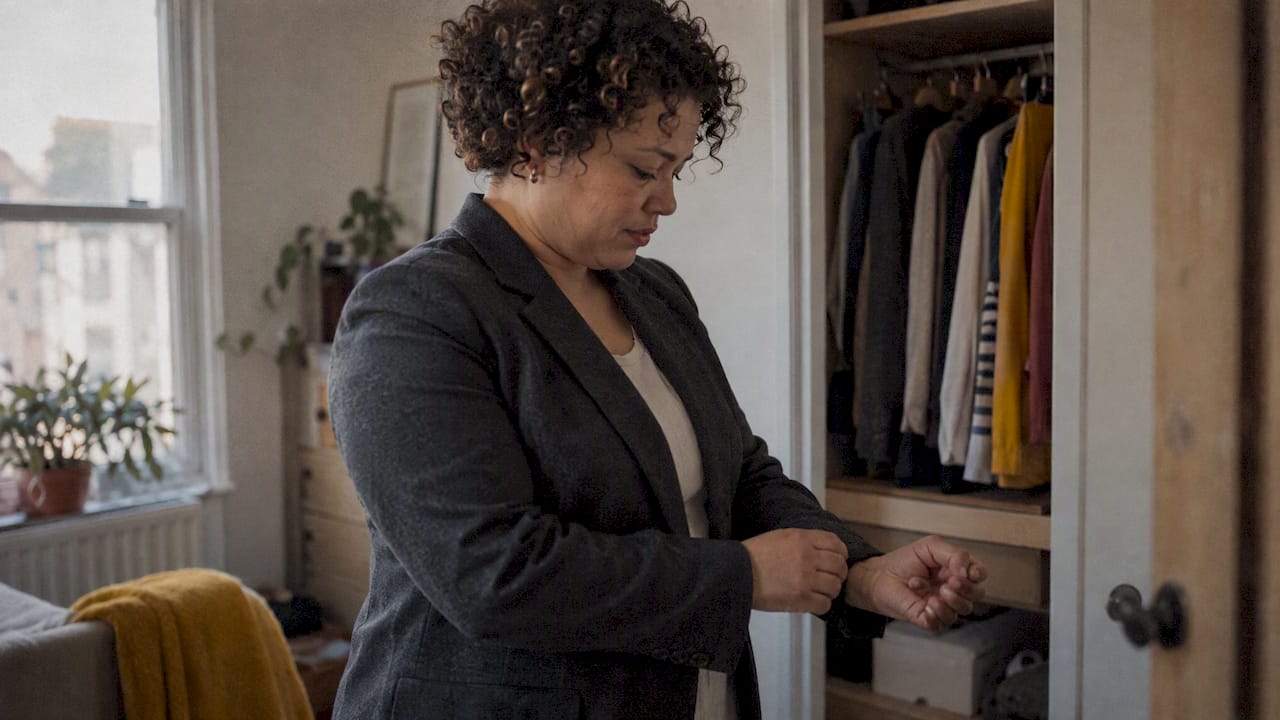
Choose colours that contrast gently with your skin tone rather than blending into it. Solid mid-tones usually beat white or black next to the face. Skip busy patterns, which can shimmer on camera, and visible logos.
Groom the day before, not the morning of. Trim facial hair, tidy your hair, and keep makeup minimal and matte. Our guide to headshot hair and makeup covers prep without a stylist, and theatre makeup basics offer sound advice on keeping a base light and hygienic. If you wear glasses, clean them and check for glare.
- Do wear solid colours that fit across the shoulders.
- Do bring a lint roller and check collars.
- Don’t wear chunky jewellery or large logos.
- Don’t try a new haircut the day before.
Pro Tip: Photograph three outfits against your chosen background in daylight, then pick the one that makes your face stand out most.
How do you pose, and why do eye contact and a smile matter?
Research on professional branding identifies smiling and eye contact as powerful cues for perceived credibility, and the recruiter think-aloud study cited above points the same way. In practice, look straight into the lens as if greeting someone you like, because the lens is your reader.
Three poses work for almost everyone:
- Straight-on with a slight shoulder angle: face the camera, turn your shoulders about 30 degrees, and keep your chin level.
- Three-quarter turn: angle your body further away, then turn your head back to the lens for a confident look.
- Relaxed lean: shift your weight forward onto the front foot and tilt slightly towards the camera for warmth.
Practise with short video clips or burst selfies, then scrub through and pick frames where your eyes look soft and the smile reaches them. A natural smile creases the corners of the eyes and does not show every tooth.
- Roll your shoulders back, then drop them away from your ears.
- Lengthen your neck and push your forehead gently towards the camera.
- Relax your jaw, blow out a breath and think of something funny.
- Check that your chin is level and your eyes are open wide enough.
Pro Tip: Blink just before each shot and open your eyes on the count of three, which avoids the half-closed look.
Which backgrounds and lighting work best for LinkedIn photos?
Choose a neutral backdrop when you want maximum focus on your face: soft grey, muted blue or warm stone. A subtle environmental background, such as a blurred office or a calm outdoor setting, suits roles built on people and place. A textured studio backdrop adds depth without clutter. Our guide to headshot background colours shows how each tone reads on screen, and clothing should contrast with it: a navy jacket vanishes against a navy wall.
For natural light, stand facing a large window, ideally one that does not receive direct sun, so the light falls softly across your face. Golden hour looks warm but moves fast and can cast strong colour, so use it only if you can shoot quickly. For artificial light, a softbox gives even, flattering illumination, while a flash bounced off a white ceiling or wall is a decent budget substitute. Our outdoor headshot sessions make good use of natural light.
Run these quick checks before shooting:
- Do keep a clear gap between you and the backdrop so it blurs.
- Do remove clutter and bright objects behind your head.
- Don’t let lines or plants appear to grow from your shoulders.
- Don’t mix window light with strong overhead bulbs, which cast an uneven colour.
How should you crop and size a LinkedIn headshot?
Frame your head and the top of your shoulders, with your face taking roughly 60–80% of the frame. Place your eyes about a third of the way down the image, which feels balanced and keeps your gaze prominent in a small circle.
- Shape: LinkedIn displays your photo in a circle, so shoot a square image with space around your head to survive the crop.
- Resolution: upload a sharp file well above thumbnail size, since small files look soft on large screens. LinkedIn’s own help pages give the current limits.
- File size: keep the image compressed enough to upload quickly without visible blockiness.
- Preview: view your profile on desktop and on your phone before saving, and check that your chin is not clipped or your frame too tight.
Retouch lightly: even out skin tone and remove a temporary blemish, but never reshape features. Recruiters should recognise you at an interview.
Should you hire a pro, shoot it yourself or use AI?
A professional session gives you direction, controlled lighting, purpose-led framing and quick delivery. That matters when you need consistent images for a team or a personal brand.
To DIY with a smartphone, mount it on a tripod at eye level, use the rear camera, shoot near a window and record a short video. Then extract the best frame, since a video gives you a range of expressions to choose from.
AI headshot services generate polished images from your uploads. They are consistent and convenient, but the results can drift from how you actually look, which undermines trust when you meet someone in person.
Use this checklist to choose:
- Hire a professional if you need consistent brand images or you are senior, client-facing or leading a team.
- Shoot it yourself if your budget is tight and you are comfortable directing yourself.
- Use AI only if the output still looks like you, and be ready to retake in person.
How do you prepare for the shoot and what should you bring?
Preparation can make a stressful session easier. Tell your photographer where the image will appear, who will see it and the tone you want, because purpose decides framing, background and wardrobe.
Time your session for good light: mid-morning is often reliable for window-lit shots. The time needed for a professional session or a careful DIY attempt varies with the setup and the shoot.
- Two outfit options, plus a spare shirt or blouse in case of spills.
- A small grooming kit: comb, blotting papers, lip balm and a mirror.
- A glasses cloth and a lint roller.
- Water, and a snack to avoid a dry mouth.
On the day, arrive early, check collars and hair in good light, and warm up your face with a few slow, exaggerated expressions. Keep eye contact with the lens between frames so you do not stiffen between shots.
How do you edit, select and upload your final photo?
Pick your favourite by looking at expression first, then clarity, eye contact and light. Ask a trusted colleague to choose between your final two, because you will judge yourself harshly.
- Selection: choose the frame where you look friendly and credible, not just flattering.
- Retouching: limit edits to minor skin tone and blemish removal.
- Format: export as a high-quality JPEG or PNG at a generous square size.
- File size: compress modestly so it loads quickly without visible blockiness.
86% of recruiters screen profiles within 30 seconds or less. That is a short window, and your photo is among the first things a visitor sees, so it is worth updating.
How can your headshot communicate your personal brand?
Your headshot should say something before anyone reads your headline. Start by naming the impression you want: approachable, authoritative, creative or calm. Then choose elements that support it.
A consultant selling trust might wear a structured jacket against a quiet grey background with a measured, warm smile. A designer might choose a bolder colour, a textured wall and a livelier expression. An early-career professional might favour openness and energy over formality.
Match your photo to your audience as well. If clients are in finance, an overly casual image can raise doubts. If you serve start-ups, a stiff studio portrait can feel distant. Look at profiles of people you admire in your field and notice what they share, then adapt it to your own personality rather than copying.
Keep consistency in mind. The same photo, or a close variation, across your website, speaker bios and email signature builds recognition. Refresh it when your look changes, so people meet the person they saw online.
Finally, consider how the photo works with your headline and banner. A clear, friendly portrait paired with a focused headline reads as one message. Our personal branding portrait sessions begin by working out that message before a single frame is taken.
How do you choose between a professional photographer and DIY?
Start with the stakes. If your profile drives business, hiring or speaking invitations, a professional pays for itself in confidence and consistency. If you simply need a tidy, current photo, a careful DIY shoot can do the job.
When choosing a photographer, review their portfolio for people who look natural, not stiff, and for lighting you like. Check that their style fits your industry. Ask how they direct sessions, how many finished images you receive, how quickly they deliver and what the usage rights are. Clear pricing up front avoids surprises. Our LinkedIn headshot photographer page shows what a session looks like.
If you go DIY, set yourself up to succeed. Use a tripod and a timer or remote, shoot in soft window light, and take many frames. Ask a friend to stand behind the camera and talk to you, since a conversation relaxes your face far better than staring at a lens alone.
Be honest about your comfort in front of a camera. Many people tense up when they direct themselves, and the result shows. A skilled photographer draws out expressions you could not stage alone, which is where much of the value sits. If you are unsure, book a short session and compare it with your own attempts.
What retouching and editing suit a LinkedIn profile?
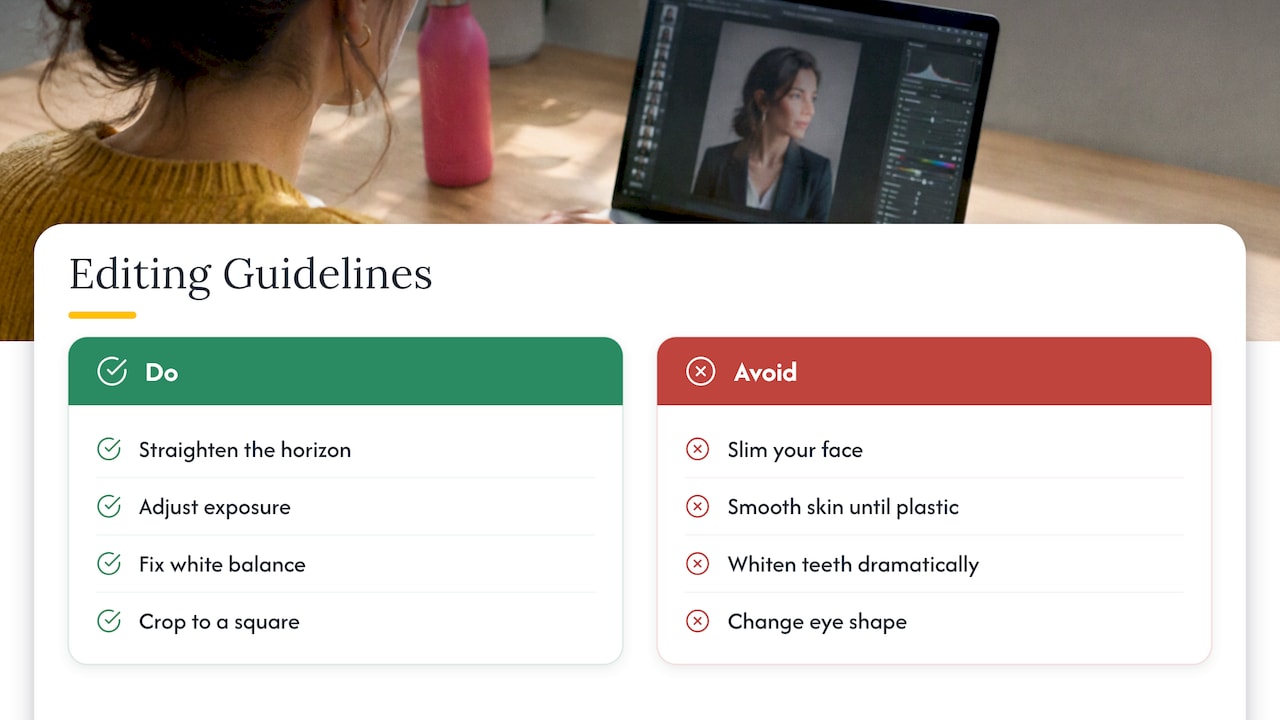
Edit to look like yourself on a good day, not like someone else. Start with technical corrections: straighten the horizon, adjust exposure and fix white balance so skin tones look natural. Then crop to a square, keeping your head clear of the edges, because LinkedIn crops your photo into a circle.
Retouching should stay light. Remove a temporary blemish, soften a stray flyaway hair and reduce dark circles slightly. Avoid slimming, smoothing skin until it looks plastic, whitening teeth dramatically or changing eye shape. Recruiters and clients meet you eventually, and a gap between photo and person damages trust.
Pay attention to colour and contrast. A gentle lift in brightness and a touch of contrast make a small thumbnail legible. Check the image at its smallest display size to confirm your face still reads clearly. Make sure your background is not too bright or too dark, so you stay the focus.
Consider your data as well. If photos of colleagues or clients appear in your original frame, crop them out before uploading. The Information Commissioner’s Office offers guidance on handling images of people.
Keep your original file and save the edited version separately, so you can redo the crop later if needed. Export in a high-quality format, then view your profile on both desktop and mobile. If anything looks off, adjust and re-upload before moving on.
An editor’s view: why purpose beats polish
Most people choose a headshot by asking whether they look good. We would argue that is the wrong first question. The better one is what the photo is for, because a flattering image with no purpose still leaves viewers unsure why they should message you.
At LemonLens we start every session by clarifying that purpose: who will see the photo, what they should feel and what you want them to do next. That shapes directed posing, a background chosen for your field and a quick turnaround so the image is still relevant when you need it. A casual headshot leaves these choices to chance, while a directed session makes each one deliberately.
So before you pick your next photo, ask whether it reflects your goal or simply your best angle. You may find the two are closer than you think once someone helps you direct them.
— Emmet
How can LemonLens help you get your headshot?
If you would rather hand this to a professional, our portrait sessions are built for exactly that. The Solo is a single-person session priced at £200. The Brand is £500, and The Team starts from £795. Each is directed from the first frame, so you leave with images that fit your purpose. See our portfolio, then book a portrait session or ask for a quote through our LinkedIn headshot page.
FAQ
What is the best background for a LinkedIn headshot?
A plain, softly lit background in a neutral tone such as grey, muted blue or warm stone keeps attention on your face. Pick a colour that contrasts with your clothing so you do not blend in.
How should I smile in a LinkedIn profile photo?
Aim for a relaxed, natural smile that reaches your eyes. Research on professional personal branding found that smiling and eye contact positively influence perceived credibility, so look straight into the lens.
How much of the frame should my face fill?
A head-and-shoulders crop with your face taking roughly 60–80% of the frame works well. Leave a little space around your head, because LinkedIn displays your photo in a circle.
Can I take a LinkedIn headshot with my phone?
Yes. Place the phone on a tripod at eye level, face a window for soft light and record a short video, then pick the best frame. Keep retouching light so you still look like yourself.
Sources
- LinkedIn Study Shows 86% of Recruiters Screen Profiles Within 30 Seconds | Onrec
- [RePub, Erasmus University Repository:
Professional personal branding: Using a “think-aloud” protocol to investigate how recruiters judge LinkedIN profile pictures](https://repub.eur.nl/pub/96709/) - Semanticscholar